Startup
Activation Blockers Surface Late
IRB submissions, contracts and credentials move in parallel across sites. Without one view, the blocker is usually found after the escalation meeting.
Clinical Trial Management System
Operational visibility across multi-center trials, from site activation and milestones to monitoring visits, investigator payments and cross-site analytics.
The Operational Gap
Multi-center trial operations usually live across a startup tracker, monitoring folder, payments workbook and inbox. Clinera CTMS turns those fragments into one operational record.
IRB submissions, contracts and credentials move in parallel across sites. Without one view, the blocker is usually found after the escalation meeting.
Monitoring reports are written, circulated and closed weeks after the visit. Findings that should trigger action stay buried in unsigned documents.
Activation dates, signed visit reports and payment triggers are reconstructed from trackers, folders and mailboxes when teams need them most.
One Operational Record
Clinera CTMS keeps operational status readable from the system rather than compiled for every meeting. It connects with the Clinera platform so site status and enrollment stay aligned.
IRB and EC submissions, contracts, activation checklists and investigator credentials tracked per site.
Study milestones carry target and actual dates, so slippage is visible while it can still be recovered.
Pre-study, initiation, interim and close-out visits are scheduled, documented and signed electronically.
Milestone-triggered payment rules keep site financials tied to the operational record.
Capabilities
Five modules cover the operational lifecycle: site onboarding, milestone tracking, monitoring visits, site financials and cross-site analytics.
Feature 01
Keep every site's route to activation visible while it is still being walked.
Startup Pipeline
Site Activation
Feature 02
Track planned against actual on the milestones that decide whether a study is on schedule.
Milestone Timeline
Planned vs Actual
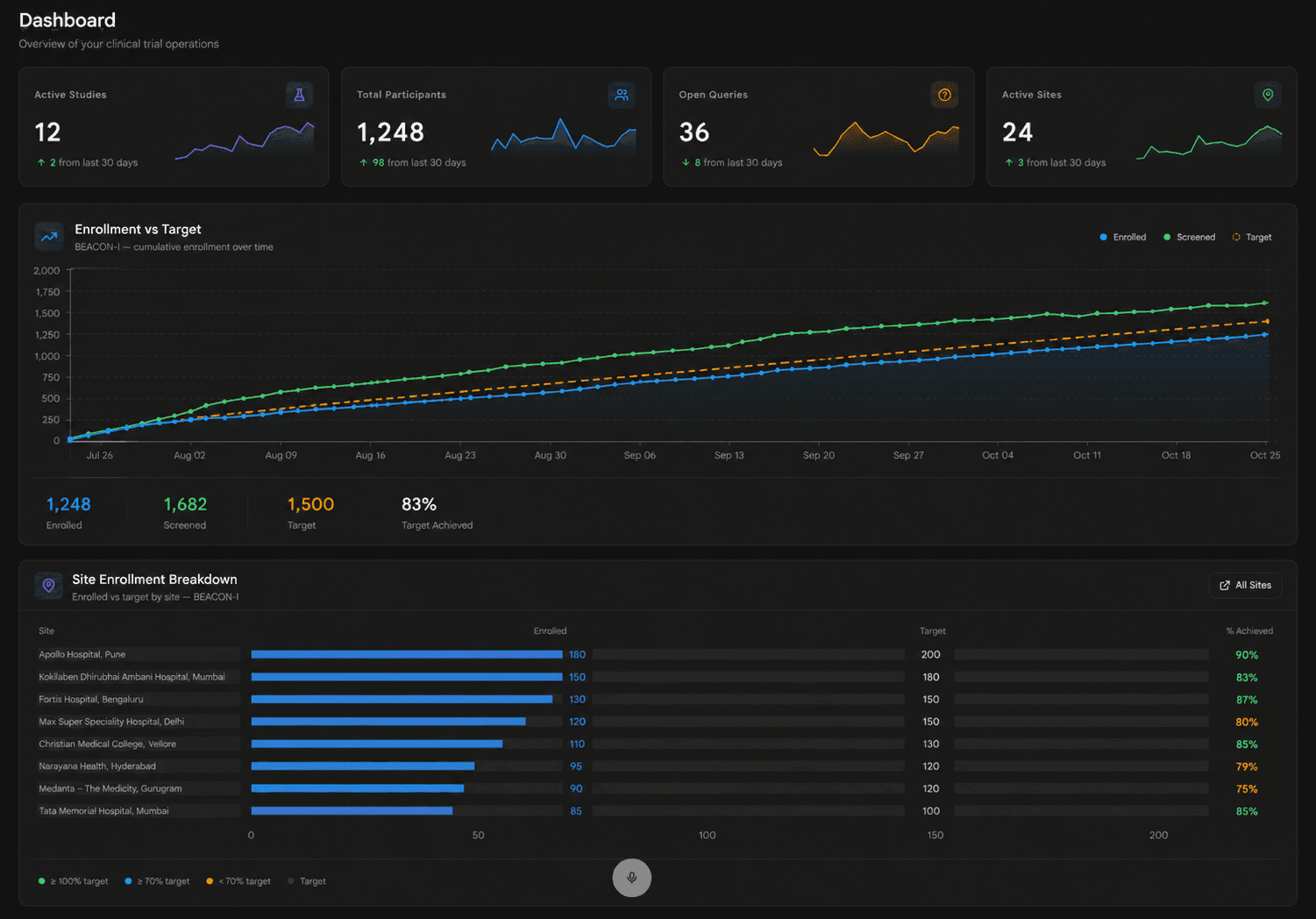
24
Active Sites
83%
Target Achieved
36
Open Queries
Feature 03
Schedule the visit, write the report and close it out in the same place.
Monitoring Visit Report
Site 04 - Interim Visit
Open Findings
Sign-Off Route
Feature 04
Connect what a site did to what it gets paid, with the evidence attached.
Site Financials
Milestone-Triggered Payment
Audit Trail
Trigger, invoice, approver and timestamp stay attached to the payment record.
Feature 05
Read study health from the operational record rather than from a status deck.
Executive Dashboard
Study Health
Enrollment
On Plan
Monitoring
At Risk
Queries
Improving
Workflow
The study moves through four operational stages, and the record from each one stays available for the next.
Selected sites enter the startup pipeline, where submissions, contracts, checklists and credentials are tracked to activation.
Study milestones are set with planned dates, from first patient in through database lock.
Visits are scheduled, documented and electronically signed by the PI and project manager.
Milestone rules release site payments while dashboards read live from the same data.
Use Cases
Recurring operational jobs across running studies and portfolios.
Run activation across sites with blockers visible per site, so escalation goes where it is needed.
Sponsors see monitoring completion, enrollment and query backlog directly from the study record.
Activation dates, signed visit reports and payment approvals are already in one controlled record.
Study health scores and milestone variance give operations leadership a comparable read on every active study.
Role Benefits
Four roles work the same operational record from different ends: startup, monitoring, site delivery and oversight.
Run the startup pipeline, set milestones and track planned against actual across sites.
Slippage visible while there is still time to act on it.
Schedule monitoring visits, document reports, raise findings and close follow-up actions.
Visit reports close in days instead of sitting unsigned.
Review and sign visit reports, track site milestones and see payment status.
Clear view of what the site owes and what it is owed.
Read cross-site enrollment, monitoring velocity, query backlog and study health scores.
Oversight from live data rather than a compiled report.
Why Clinera CTMS
CTMS and EDC share the Clinera platform, so operational dashboards read from the same study foundation instead of a weekly export.
A payment is linked to the milestone that triggered it and the approval that released it, creating a record finance and audit teams can follow.
Built for sponsors, CROs and research institutions that need control without the weight of an enterprise CTMS rollout.
Specifications
Clinera CTMS is deployed as part of the Clinera platform and inherits its security, audit and access-control model.
FAQ
Yes. The CTMS is the operational system of record for site status, milestone dates, visit completion and payment triggers. The eTMF holds the documented evidence filed for inspection.
Clinera assigns one system of record per data domain. Subject and visit data belongs to the EDC and is read by the CTMS. Site status, milestones and financials belong to the CTMS.
Sign-off captures signer identity, role, intent and timestamp against the specific report version. Compliance also depends on your validation and procedures, so validation documentation is provided for quality review.
Payments are released by rules tied to defined milestones, such as a completed visit or enrollment threshold. Each release is checked against prior payments on that budget line.
Yes. Active studies can be onboarded with historical site status, milestone dates and payment position. Source-data gaps are identified during migration mapping.
Next Step
Bring your current startup tracker and one site budget. We will show how the same information looks once activation, milestones and payments read from a single record.
From our insights

Site activation timelines rarely slip on one big delay. They slip on six small serial ones. Where start-up…

Where publication timelines are lost after last patient out, and how electronic data capture, query cycles…

Paper CRFs, scattered data, slow queries and delayed publications: five signs a clinical research workflow is…